





Roughly 60-80% of the total latency budget in a high-speed inspection line can be traced back to the image acquisition path, and a significant portion of that figure is determined by a single card sitting inside the host PC: the frame grabber. In machine vision systems built for throughput rates exceeding a few hundred parts per minute, the difference between a system that keeps pace with the production line and one that becomes a bottleneck often comes down to how efficiently raw pixel data moves from the sensor to system memory. Frame grabbers are the hardware bridge that makes this transfer deterministic, low-latency, and compatible with demanding industrial protocols.
For engineers specifying machine vision components for a new inspection cell or robotic guidance station, the frame grabber is frequently underappreciated relative to cameras and lenses, yet it governs bandwidth ceilings, triggering precision, and CPU offload in ways that directly affect measurable throughput. This article examines what frame grabbers do, how they differ from simpler acquisition methods, and what technical criteria should guide a purchasing decision for demanding factory-floor applications. industrial vision systems
What Exactly Does a Frame Grabber Do Inside a Vision System?
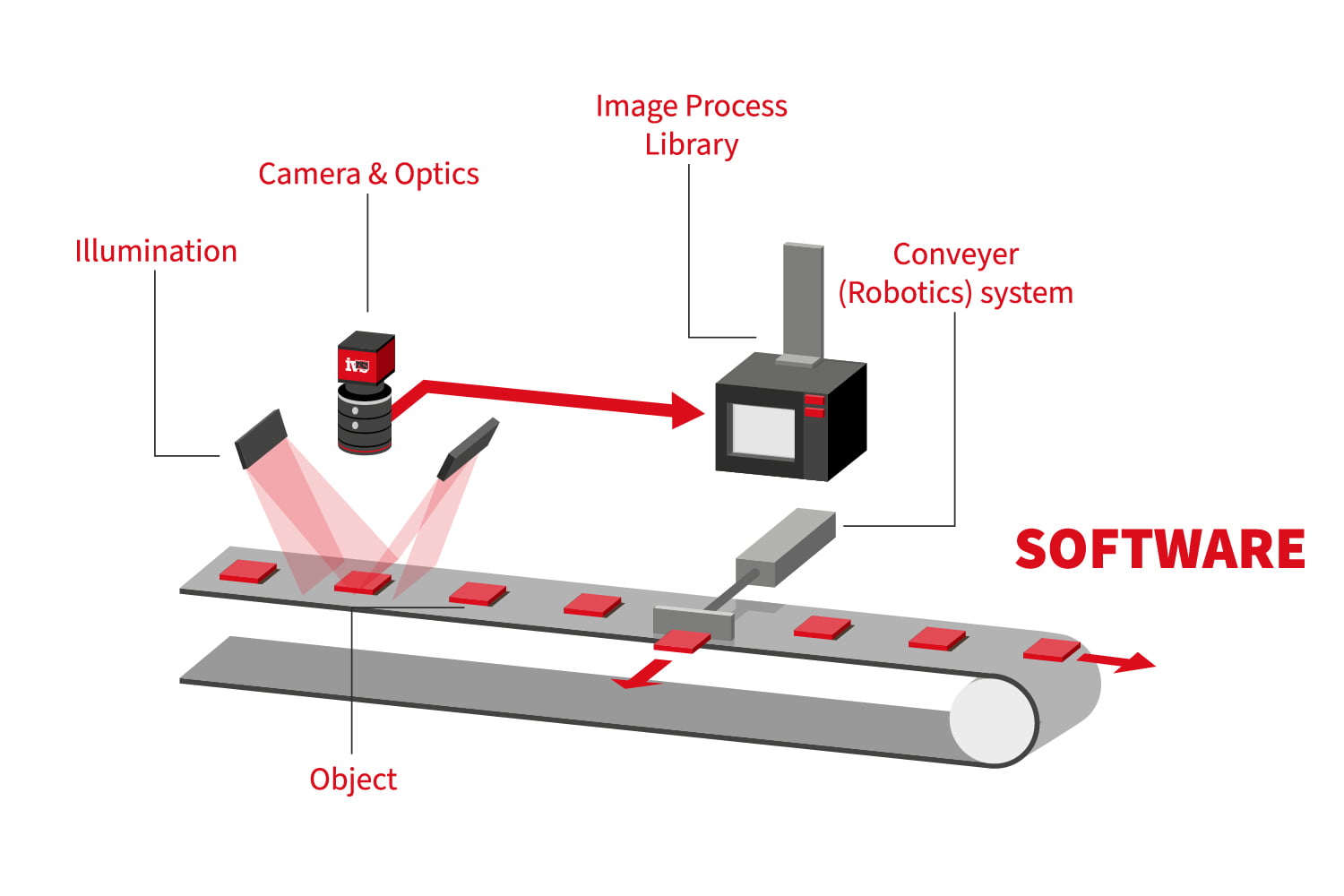
A frame grabber is a dedicated hardware interface, typically a PCIe card, that captures digital or analog video signals from a camera and converts them into a format the host computer can process, usually depositing image data directly into system RAM via DMA transfer. Unlike a standard network interface card handling GigE Vision traffic in software, a purpose-built frame grabber offloads protocol handling, buffering, and often basic image correction to dedicated onboard silicon, freeing the CPU for the actual inspection algorithms. This distinction matters enormously in multi-camera setups, where four or eight sensors streaming simultaneously can otherwise saturate a general-purpose processor before any analysis even begins.
The functional core of a frame grabber includes a physical interface connector matched to the camera’s output standard, an onboard FPGA or ASIC for real-time signal processing, a frame buffer to smooth out timing irregularities, and a bus interface, almost universally PCIe in current designs, to move data into host memory at sustained rates. Many industrial-grade cards also expose isolated digital I/O lines for hardware triggering and strobe control, which is essential when the camera must fire in exact synchronization with a conveyor encoder or a robotic arm’s motion controller. Without this dedicated triggering circuitry, jitter in the millisecond range can introduce blur or misalignment in high-speed line-scan applications.
It’s worth noting that not every machine vision camera requires a separate frame grabber. USB3 Vision and GigE Vision cameras can often connect directly to a standard PC port, and for throughput below roughly 1-2 Gbps this is a perfectly viable, cost-effective configuration. Frame grabbers become necessary, rather than optional, when working with Camera Link, CoaXPress, or high-resolution/high-frame-rate sensors whose aggregate data rate exceeds what commodity interfaces and software drivers can reliably sustain without dropped frames.
Which Interface Standards Should Engineers Prioritize in 2024?
Interface selection is arguably the single most consequential decision when specifying a frame grabber, because it dictates cable length, achievable bandwidth, and long-term compatibility with future camera upgrades. CoaXPress (CXP) has become the dominant standard for high-bandwidth industrial applications, with CXP-12 links supporting up to 12.5 Gbps per connection and allowing multiple coax cables to be aggregated for even higher aggregate throughput. Camera Link, while older, remains embedded in a large installed base of line-scan systems and is still specified for new projects where proven reliability outweighs the appeal of newer standards. machine vision cameras
Bandwidth headroom should never be calculated against average throughput alone; peak burst requirements during trigger-synchronized capture windows determine whether a frame grabber will drop frames under real production conditions.
GigE Vision and 10GigE Vision cameras occupy the middle ground, offering cable runs up to 100 meters without repeaters and simplified network-based integration, though they typically require a specialized frame grabber only when aggregating multiple camera streams onto a single controlled PCIe interface for deterministic timing. Engineers integrating machine vision lenses and sensors for applications like PCB inspection or semiconductor wafer scanning should evaluate not just current bandwidth needs but the headroom required for a next-generation sensor upgrade, since replacing a frame grabber mid-lifecycle is considerably more disruptive than replacing a camera alone.
How Much Bandwidth Does a Typical Inspection Line Actually Need?
Consider a practical sizing example: a bottling line running at 600 containers per minute, inspected by a 5-megapixel camera capturing one 8-bit grayscale frame per container. Each frame contains roughly 5 million pixels, or 5 MB of raw data. At 600 frames per minute, that’s 10 frames per second, producing a sustained data rate of approximately 50 MB/s, or 400 Mbps. A single GigE connection handles this comfortably with margin to spare. Now scale the same logic to a multi-camera electronics inspection station using four 12-megapixel color cameras at 30 frames per second each: raw throughput jumps to roughly 4.3 GB/s in aggregate, a figure that immediately rules out GigE and points toward CoaXPress or a multi-lane Camera Link HS configuration with a frame grabber capable of sustaining that combined bandwidth without buffer overflow.
How Do Frame Grabbers Affect Latency and Triggering Precision?
Latency in a vision system accumulates across several stages: sensor exposure, data transfer, buffering, and software processing. A well-designed frame grabber minimizes the transfer and buffering segments by using DMA to write pixel data directly into a pre-allocated memory region, bypassing the operating system’s general-purpose I/O stack, which can introduce unpredictable delays of several milliseconds under load. For robotic guidance applications where a part must be picked within a tight motion window, this deterministic behavior is often more valuable than raw resolution, since a system that captures a sharp image ten milliseconds too late is functionally useless.
Hardware triggering capability is closely tied to this latency question. Frame grabbers with onboard trigger inputs and configurable debounce logic allow a PLC or encoder signal to initiate capture with sub-microsecond precision, which is critical when parts on a high-speed conveyor must be imaged at a consistent position regardless of minor speed fluctuations. Software-only triggering, by contrast, is subject to operating system scheduling variability that can introduce jitter of several milliseconds, an acceptable tolerance for slow-moving inspection tasks but a serious liability for high-speed sorting or web inspection applications running at line speeds above 100 meters per minute. machine vision components

What Role Does the Frame Grabber Play in Multi-Camera Synchronization?
In stereo vision, 3D profiling, or multi-angle inspection cells, several cameras must capture images at precisely the same instant to produce a coherent composite result. Frame grabbers designed for multi-camera synchronization typically provide a shared trigger distribution circuit, ensuring that all connected cameras receive the fire signal within nanoseconds of each other rather than relying on software-issued commands that traverse different code paths with variable delay. This hardware-level synchronization is one of the more compelling reasons to select a dedicated grabber over direct-to-PC camera connections when building any system that fuses multiple viewpoints into a single measurement.
Frame Grabber vs. Direct Camera Connection: Which Fits Your Application?
The decision between a dedicated frame grabber and a direct camera-to-PC connection hinges on throughput, determinism, and scalability rather than cost alone. The table below summarizes how these two approaches compare across attributes most relevant to industrial deployment.
| Attribute | Dedicated Frame Grabber | Direct Camera Connection (USB3/GigE) |
|---|---|---|
| Typical sustained bandwidth | Up to 50 Gbps aggregate (multi-lane CXP-12) | Up to 10 Gbps (10GigE), 5 Gbps (USB3) |
| Hardware trigger jitter | Sub-microsecond, dedicated I/O circuitry | Several milliseconds, OS-dependent |
| CPU load at high frame rates | Low; DMA and FPGA offload processing | Higher; driver stack consumes CPU cycles |
| Multi-camera hardware sync | Native, via shared trigger distribution | Requires external synchronization hardware |
| Cable run distance | Up to 100m (CXP with repeaters), 15m (Camera Link) | Up to 100m (GigE), 3-5m typical (USB3) |
| Relative system cost | Higher upfront hardware investment | Lower, fewer components required |
For low-speed, single-camera applications such as basic presence/absence checks or barcode reading, a direct connection remains the pragmatic choice and avoids unnecessary hardware complexity. As soon as a project involves multiple synchronized cameras, line-scan sensors, or throughput exceeding what GigE or USB3 can sustain without frame drops, the frame grabber shifts from a luxury to a functional requirement.
How Do You Integrate a Frame Grabber With Existing Machine Vision Software?
- Confirm GenICam GenTL producer compliance for your chosen software platform
- Verify PCIe lane allocation matches the card’s rated bandwidth
- Check hardware trigger input specifications against your motion controller’s signal type
- Assess onboard memory buffer size relative to your peak burst frame rate
- Request documented link-loss recovery behavior for continuous operation environments
What Does a Frame Grabber Cost, and What Drives the Price Difference?
Getting the Frame Grabber Decision Right the First Time
Frequently Asked Questions About Frame Grabbers
Do I need a frame grabber if I’m already using a GigE Vision camera?
Not necessarily. A single GigE Vision camera connects directly to a standard network port and works well for throughput under roughly 1 Gbps. A frame grabber becomes valuable when you need hardware-level triggering precision, multi-camera synchronization, or when aggregating several camera streams would otherwise overload a standard network interface card.
Can a frame grabber cause frame drops, and how would I diagnose that?
Yes, frame drops typically occur when sustained data rates exceed the card’s PCIe bandwidth allocation or when the onboard buffer is too small for the peak burst rate. Diagnosis usually starts by checking driver-level error counters and confirming the PCIe slot is running at its rated lane width, since a card physically installed in a lower-bandwidth slot will silently underperform its specification.
How long does a typical industrial frame grabber remain supported by the manufacturer?
Most industrial-grade frame grabber vendors commit to firmware and driver support for 7-10 years to align with typical factory automation equipment lifecycles. It is worth confirming this explicitly in writing during procurement, since consumer-grade or lower-tier industrial cards sometimes have considerably shorter support windows.
Is CoaXPress or Camera Link the better choice for a new line-scan inspection project?
CoaXPress is generally the stronger choice for new designs because it offers higher per-cable bandwidth, longer cable runs, and simpler single-cable installation compared to the multi-cable configurations often required by Camera Link at higher data rates. Camera Link remains a reasonable choice mainly when integrating with existing legacy equipment already built around that standard.
What happens if my frame grabber’s PCIe slot doesn’t provide enough power for the card?
Insufficient power delivery can cause intermittent link errors, unexpected card resets, or failure to initialize at boot, which often gets misdiagnosed as a software or driver problem. Checking the card’s power draw specification against your chassis PCIe slot rating before installation, and using auxiliary power connectors where the card provides them, prevents this class of hard-to-trace fault.
